Taking Great Holiday Photos with the iPhone
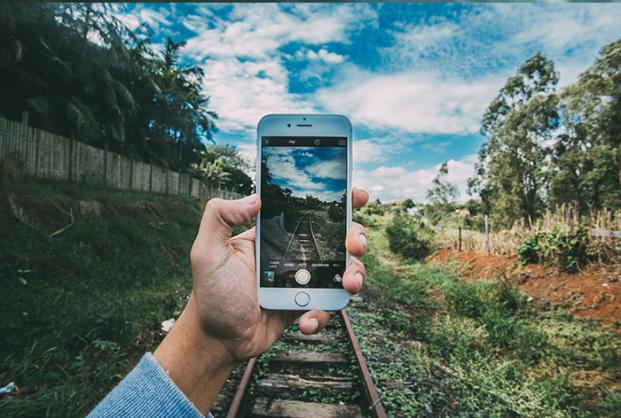
A picture is worth a thousand words. This is why everyone takes so many photos while on holiday. Each photo tells a little bit more of the story of any amazing trip. Before we had to have the best equipment on the market for taking great holiday photos. Things have since changed. You can now achieve great holiday photos simply by using your iPhone.
Having the perfect tools mean nothing if you don’t know how to use them. While the iPhone is a simple device to use as a camera, there are still many tricks to the trade in order to get the best photos. As with any skill, it takes practice to get good at it. iPhone photography is no different.
Lighting
One of the most important factors for getting the perfect photos with any camera is lighting. Good lighting can be the difference between a bad quality photo and a travel magazine cover photo. When you are taking holiday photos, it may vary whether you are indoors or outdoors. For outdoor photos such as of architecture or nature, natural light will be the best option. Shooting photos in the day time will allow you to take advantage of the sunlight. For indoor photography with the iPhone, it can be a variety of scenarios. The iPhone has an automatic lighting adjustment feature built into it. To get the best results with this feature, try tapping on the darkest part of the photo on the screen. This will usually brighten up the entire photo in an attempt to highlight the selected area.
Selfie
The iPhone makes it very simple for capturing those selfie moments. The front camera is specifically designated as a “selfie-camera” and allows you to see yourself as you take the picture. One thing to note is that the captured image is actually flipped. There are post-editing tricks for getting the photo back to what you see originally which are mentioned later. Most people still rely on the on-screen capture button for taking the photo. Depending on the angle you hold the phone (and your hand size) this could make handling the photo difficult. One trick is to use either of the volume buttons. In camera-mode, these buttons function the exact same as the capture button.
Zoom
It’s best to maintain the original zoom to get the best quality photos with the iPhone. While taking photos of landmarks or landscapes from afar, it’s definitely tempting to use the built-in zoom feature to get a closer look at it. Over using this feature, however, can lower the quality of the picture. If possible, try to move closer to what you’re shooting. Sometimes taking the wider photo and manually zooming in when viewing can give the closer view a better resolution. A lot of this has to do with the lighting as well. In case you’re unsure about whether to try the zoom or not, just take both pictures. It’s better to delete one of the photos after than it is to wish you had taken it in the first place.
Panoramic
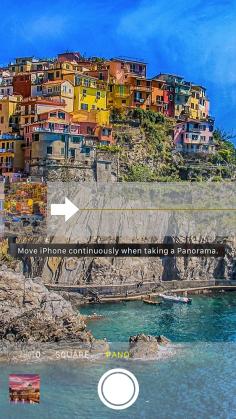 One feature that’s often overlooked on the iPhone is Panoramic photography. This feature is great capturing wide landscape shots. There is always the scenario of having a great view but not being able to stand back far enough to capture the entire scenery. With the panoramic feature, you can fit more than 180 degrees in just one shot. The feature is simple to use but there are a few tricks for getting the best shots with it. Once you press the photo button, you have to move your camera sideways, following the arrow that shows on the screen. For the best photos, it’s best to move it slowly to avoid any blurred movement. Trying to keep your phone level is also very important to create the best image possible.
Practise & Reference
Photography is a developed skill. In order to get better at it you have two options. The first option is to practise. Taking a lot of photos over time will naturally develop you into a great photographer and the iPhone is a great tool for practice. The second option is looking at other photos. Holiday photos taken of landmarks are great for perfecting your skills. Many of these sites are highly photographed. You can find many pictures of them via social media just by searching. Looking at lots of photos of a specific landmark or viewpoint will let you get new ideas for how to capture them. The iPhone is small enough to be able to position it as you need. Try different angles and perspectives on the same scenery or landmark. Each model of the iPhone has sufficient storage to allow you to snap photos all day until you find the perfect photo.
Edits
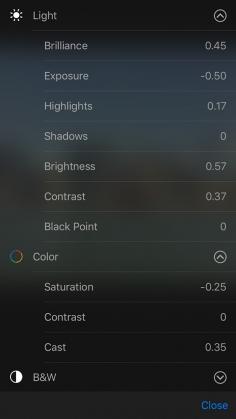 The iPhone makes it simple for quick edits and photo touchups. The latest models of the iPhone have begun to add several editing features built into the camera. These features include a variety of filters, coloring options, and crop tools. Being the iPhone, you also have access to the app store. You can find countless applications for photo editing. There is an app for achieving almost any style photo that you can imagine. The iPhone provides all of these tools in the palm of your hand so you can make edits immediately after taking the pictures. This saves you the time of having to upload them to the computer and into expensive photo-editing software.
Taking holiday photos with the iPhone is often preferred as you don't have to lug around a heavy DSLR. Since you are taking photos and editing them right on the device itself, it makes the entire process much more convenient. The best part is being able to share your holiday photos with family and friends. You no longer have to wait to get pictures developed and mailing them halfway across the country. You can simply take the photos and send them directly to anyone via message or uploaded onto social media. You’ll quickly discover that the iPhone makes taking holiday photos a much more enjoyable experience.